顯示具有 iPhone 標籤的文章。 顯示所有文章

2012/03/07

在 UIScrollView 裡面的 UITextView 會 auto scrolling?

很奇怪的問題,我把 UITextView 放在 UIScrollView 裡面,當我 assign 文字給 UITextView 時,捲軸會自動跳到 UITextView 的位置!

Google 一下,發現其他人也會遇到一樣的問題:
好像是 assign 的時候觸發 becomes first responder 所造成的


試了網路上的解法都沒有用,最後我的做法是:
  1. 把原本畫面上的 UITextView 改用 UIView 取代
  2. 自己 alloc 一個 UITextView 然後把 text 與 style 都設定好
  3. 最後用 addSubview 的方式加到畫面裡
UITextView *txtView = [[UITextView alloc] initWithFrame:self.tempView.frame];
txtView.text = @"Message what you want";
txtView.backgroundColor = [UIColor clearColor];
txtView.editable = NO;
txtView.font = [UIFont systemFontOfSize:16];
[self.view addSubview:txtView];
[txtView release];

It's work! 供大家參考一下

2011/09/19

製作 iPhone/iPad 電子書

想要製作可以在iPhone/iPad上瀏覽的電子書嗎? Go ahead!

首先要釐清,是想做『iBook電子書』還是『電子書App』
  • iBook電子書是可以用iBook這個app來瀏覽的文件檔,透過iTunes就可以自己同步到iPhone/iPad裡面。
  • 而製作一個獨立的電子書App手續就麻煩多了。首先你必須跟Apple申請一個開發者帳號 (年費NT3000),再來製作自己的App(可能需要會寫程式),最後把app submit到apple store,待工作人員審核過了,就可以在apple store供大家下載。

如果你只是想打發時間,想把網路小說放到iPhone那就選擇第一項。如果是想營運收費,那兩樣都可以上架收費。


iBook電子書製作

App電子書製作

2011/09/04

實作 TableView Section 展開/收合

iPhone中的UITableViewController變化真的很多!
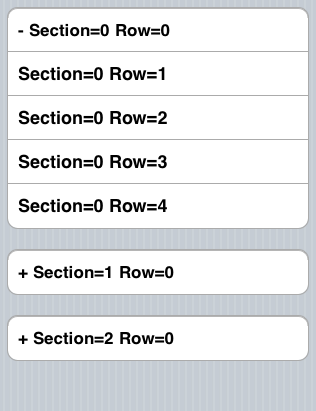
最近剛好需要實作展開/收合的功能,效果如圖所示:

我是參考Expanding/Collapsing TableView Sections的實作,然後在自己簡化。
一個展開/收合的單位為一個Section,Row0表示Parent,Row1~N表示Child,程式碼中都有註解。

2011/07/19

透過NSURLConnection和NSMutableURLRequest上傳/POST一個檔案

直接來看code
NSURLConnection *conn;
NSMutableData *tempData;  /* Store response */

- (void)uploadFile {
    NSString *boundary = @"0xKhTmLbOuNdArY";
    NSData *imgData = UIImageJPEGRepresentation(image.image, 90);  /* Image data come from UIImageView */
    NSString *urlString = @"http://my_server/upload.php";
    NSURL *url = [[NSURL alloc]initWithString:urlString];

    /* Set up request */
    NSMutableURLRequest *urlRequest = [NSMutableURLRequest requestWithURL:url];
    [urlRequest setHTTPMethod:@"POST"];
    [urlRequest setValue:[NSString stringWithFormat:@"multipart/form-data; boundary=%@", boundary] forHTTPHeaderField:@"Content-Type"];

    /* Prepare content part */
    NSMutableData *postData = [NSMutableData dataWithCapacity:[imgData length] + 512];
    [postData appendData:[[NSString stringWithFormat:@"--%@\r\n", boundary] dataUsingEncoding:NSUTF8StringEncoding]];
    [postData appendData:[[NSString stringWithFormat:@"Content-Disposition: form-data; name=\"%@\"; filename=\"file.bin\"\r\n\r\n", @"image"] dataUsingEncoding:NSUTF8StringEncoding]];
    [postData appendData:imgData];
    [postData appendData: [[NSString stringWithFormat:@"\r\n--%@--\r\n", boundary] dataUsingEncoding:NSUTF8StringEncoding]];

    /* Assign content part */
    [urlRequest setHTTPBody:postData];

    tempData = [NSMutableData alloc];
    conn = [[NSURLConnection alloc] initWithRequest:urlRequest delegate:self];
}


Prepare 4 delegate
- (void)connection:(NSURLConnection *)connection didFailWithError:(NSError *)error {
    [conn release];
    NSLog(@"Error occur");
}

- (void)connection: (NSURLConnection *)connection didReceiveResponse: (NSURLResponse *)aResponse {
    NSInteger status = (NSInteger)[(NSHTTPURLResponse *)aResponse statusCode];
    NSLog(@"%d", status);
}

-(void) connection:(NSURLConnection *)connection didReceiveData: (NSData *) incomingData {
 [tempData appendData:incomingData];
}

- (void)connectionDidFinishLoading:(NSURLConnection *)connection {
    NSString *loadData = [[NSMutableString alloc] initWithData:tempData encoding:NSUTF8StringEncoding];    
    NSLog(@"%@", loadData);
}


Server - PHP sample code
<?php 
    if (isset($_FILES["image"]))
    {
        print_r($_FILES["image"]);
    }
?>

參考資料
CocoaDev: HTTPFileUploadSample

2011/07/12

在iPhone上建立HTTP連線(GET/POST)

HTTP Get
Create request
NSString *str = @"http://my_server/get.php?name=brian&gender=male";
NSString *str_enc = [str stringByAddingPercentEscapesUsingEncoding:NSUTF8StringEncoding];
NSURL *url = [[NSURL URLWithString:str_enc] retain];
NSURLRequest *req = [NSURLRequest requestWithURL:url];
NSURLConnection *conn = [[NSURLConnection alloc] initWithRequest:req delegate:self];

Prepare delegate
- (void)connection:(NSURLConnection *)connection didReceiveResponse:(NSURLResponse *)response;
- (void)connection:(NSURLConnection *)connection didReceiveData:(NSData *)data;
- (void)connectionDidFinishLoading:(NSURLConnection *)connection;
- (void)connection:(NSURLConnection *)connection didFailWithError:(NSError *)error;


HTTP Post
NSString *content = @"name=brian&gender=male";
NSData *postData = [content dataUsingEncoding:NSASCIIStringEncoding allowLossyConversion:YES];
NSString *postLength = [NSString stringWithFormat:@"%d", [postData length]];
 
NSMutableURLRequest *request = [[[NSMutableURLRequest alloc] init] autorelease];
[request setURL:[NSURL URLWithString:@"http://my_server/post.php"]];
[request setHTTPMethod:@"POST"];

/* Header */
[request setValue:@"application/x-www-form-urlencoded" forHTTPHeaderField:@"Content-Type"];
[request setValue:postLength forHTTPHeaderField:@"Content-Length"];

/* Content */
[request setHTTPBody:postData];

connect = [[NSURLConnection alloc] initWithRequest:request delegate:self];
// 跟GET一樣設定4組delegate去接response

參考資料

2011/07/06

Facebook API with iPhone app

最近在研究怎麼使用facebook API,看了蠻多的參考資料:
Sorry 還蠻雜的,沒有太多時間做整理 ><


簡單來說,有兩件事情要做
  • 學習使用 Facebook iOS SDK
  • API有哪些?要怎麼使用?
Facebook API走HTTP協定,資料交換格式為JSON,採用OAuth方式來認證。
Facebook iOS SDK其實就是幫你搞定這些事情,預設會開啓Safari或fb外掛來display login畫面,其中還包含了permission確認,如果上述兩項無法使用,則改用SDK裡面自己刻的dialog。使用者login後會拿到auth token,之後access API都要靠它。Request包成callback形式,接到response再做對應的事情。資料格式也幫你parse成NSData格式,存取相當方便。

SDK下載按這裡

稍微整理SDK使用方式 (不同時期的SDK使用方法不太一樣,下面敘述的是2011/7的版本)